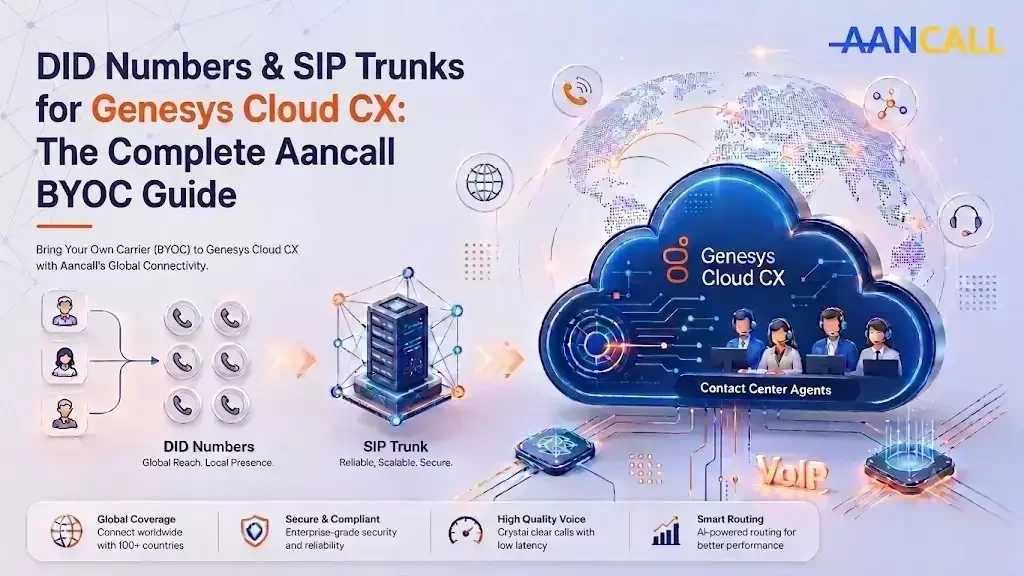
Aancall is an FCC-registered carrier offering DID numbers, toll-free numbers, and SIP trunks that connect directly into Genesys Cloud CX through Genesys' Bring Your Own Carrier (BYOC) framework.














What Is BYOC in Genesys Cloud CX?
BYOC — Bring Your Own Carrier — is the telephony model Genesys Cloud CX uses to let businesses connect their contact center to a carrier of their choice instead of relying solely on Genesys' own voice service. In practical terms, BYOC allows businesses to define SIP trunks between Genesys Cloud and third-party carrier devices or carrier services.
Genesys offers two BYOC models, and the one you pick depends on your infrastructure:
- BYOC Cloud — SIP trunks connect over the public internet directly to Genesys Cloud's Media Tier resources in AWS, using inbound routing methods such as FQDN, TGRP, or DNIS replacement to route calls to the right organization. This is the model most contact centers use with a carrier like Aancall — no on-site hardware required.
- BYOC Premises — SIP trunks terminate on a premises-based Genesys Edge appliance, useful if you already run on-site session border controllers or have a hybrid deployment.
Either way, the point of BYOC is control: you can establish and maintain your own carrier relationships and manage your own voice costs, rather than being locked into a single provider's number inventory and per-minute rates.
How Genesys Enables BYOC With Third-Party SIP and DID Providers
Genesys Cloud CX was built with an open telephony architecture specifically so customers aren't stuck with one number and trunking provider. Genesys itself frames it this way: native Genesys voice service is convenient for one-stop shopping in a limited set of countries, but for organizations that need broader geographic coverage, more competitive pricing, or more flexibility, third-party SIP trunking providers give you geographic coverage, pricing, and flexibility advantages that the native service doesn't.
This is exactly why an entire ecosystem of BYOC carriers has grown up around Genesys Cloud CX. Providers like Twilio, Bandwidth, Sinch, and Peerless (now part of Infobip) have all built certified BYOC integrations, and the setup pattern is broadly the same across carriers: you create an External Trunk inside Genesys Cloud under Admin > Telephony > Trunks, select BYOC Carrier, choose a signaling protocol (typically TLS or UDP), and configure the carrier's SIP domain and IP allowlist.
For example, Bandwidth's documented process has customers log into the Genesys Cloud CX admin console, navigate to Admin, Telephony, Trunks, select External Trunks, and create a new BYOC Carrier trunk before entering their carrier-specific settings.
Once the trunk is active, you're able to make and receive calls from your contact center using your chosen carrier's numbers — and Genesys recommends that any carrier you connect be reliable, redundant, and STIR/SHAKEN-compliant for caller ID authentication and robocall mitigation. Aancall's Genesys BYOC trunks are configured to meet exactly this bar.
Aancall follows the same open BYOC standard — which means switching to Aancall, or adding Aancall as a second carrier alongside your existing one, doesn't require any change to your Genesys Cloud CX platform itself. It's a trunk configuration change, not a platform migration.
Why Genesys Cloud CX Customers Choose Aancall as Their BYOC Carrier
Because Genesys' BYOC framework is carrier-agnostic, the real decision isn't "can I bring my own carrier" — it's "which carrier should I bring." Here's what Aancall brings to Genesys Cloud CX customers specifically:
Aancall vs. Twilio for Genesys Cloud CX BYOC
| Factor | Aancall | Twilio Elastic SIP Trunking |
|---|---|---|
| Provisioning model | Human-assisted — a provisioning specialist configures your trunk and numbers with you | Self-serve console and API; you configure and troubleshoot the trunk yourself |
| Time to first trunk | Same-day sign-up and activation | Fast, but setup is on you — self-configuration in the console or via API |
| New number provisioning | Typically within a few hours of request | Instant self-purchase, but you own the setup and troubleshooting |
| Country coverage | Local DIDs in 120+ destinations | Numbers in approximately 100 countries |
| Pricing | Competitive, transparent per-minute and per-DID rates, negotiated directly with a human account contact | Published pay-as-you-go rate card |
| Support during setup | Direct, hands-on support through your Genesys trunk configuration | Documentation, configuration guides, and community/support channels |
If your team wants to self-serve every SIP header and IP ACL entry through an API, Twilio is a solid option — Twilio has published joint solution blueprints and worked directly with Genesys to enable Elastic SIP Trunking as a certified BYOC path. But if you'd rather have a carrier's team sit with you through configuration, confirm your inbound routing method, and have your numbers live the same day, Aancall is built for exactly that.
Setting Up Your Aancall BYOC Trunk on Genesys Cloud CX
Frequently Asked Questions
Get a Quote for Any DID Number on Genesys Cloud CX
Whether you need a single UAE local number or a full multi-country toll-free rollout for your Genesys Cloud CX contact center, Aancall can have your BYOC SIP trunk configured and your first numbers live the same day.
Tell us the country, number type, and volume you need — a human on our provisioning team will get back to you with pricing and a same-day setup plan.